Configure RDS and Connect with DBeaver
Configure RDS and Connect with DBeaver
Implementation Steps
1. Access RDS Service
- Go to AWS Management Console → search for RDS.
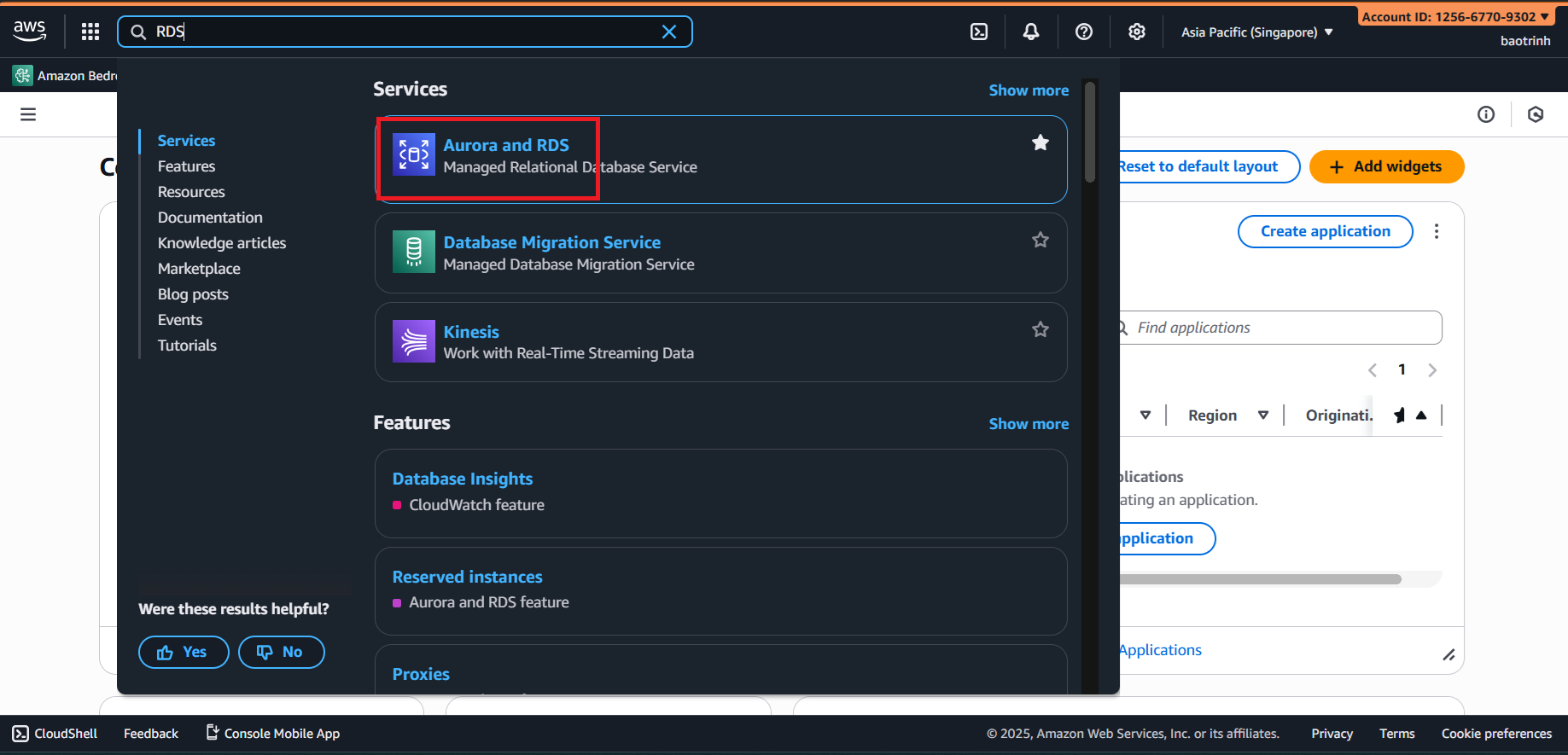
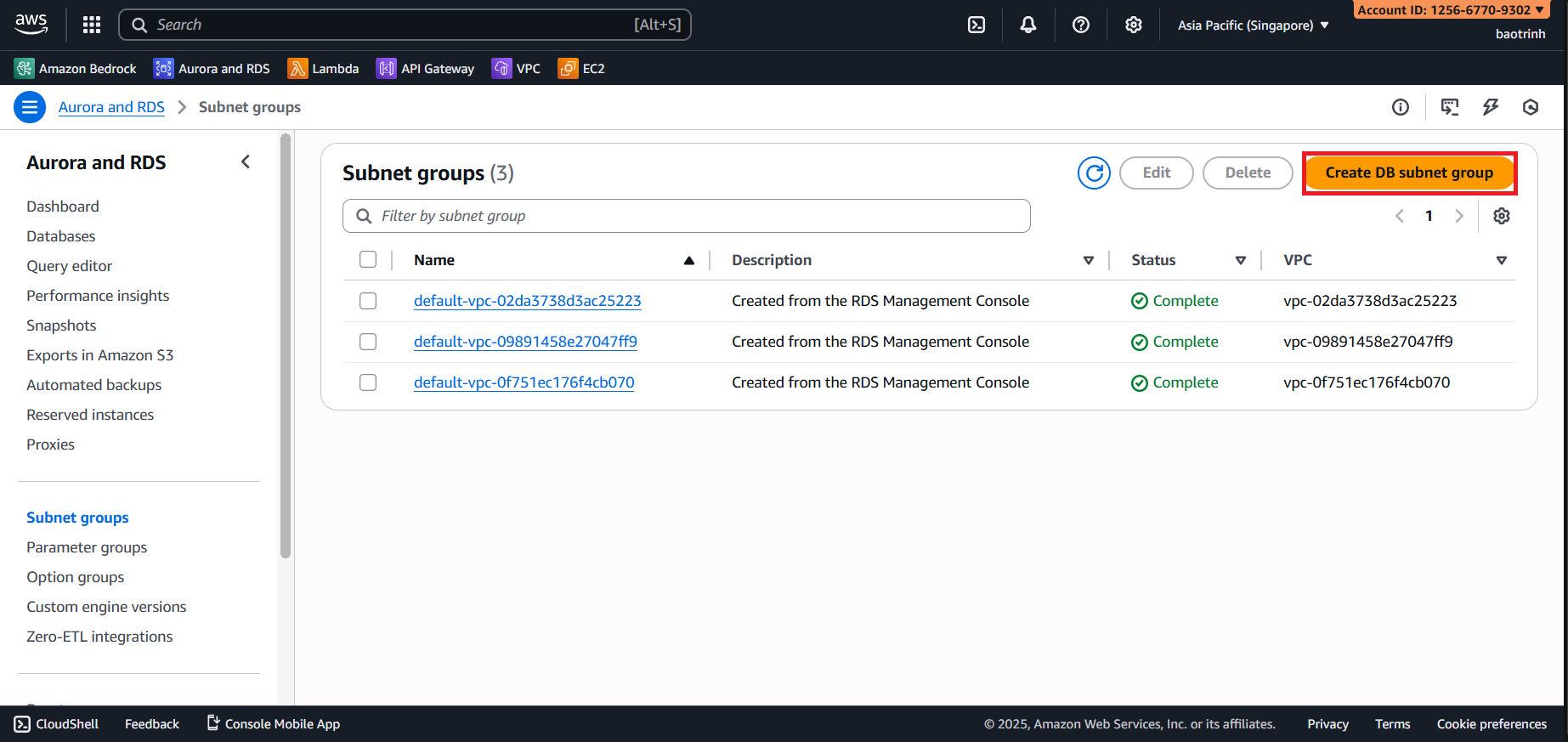
- Before creating the RDS instance, we will create a subnet group.
- Name the subnet group and select the VPC you created.
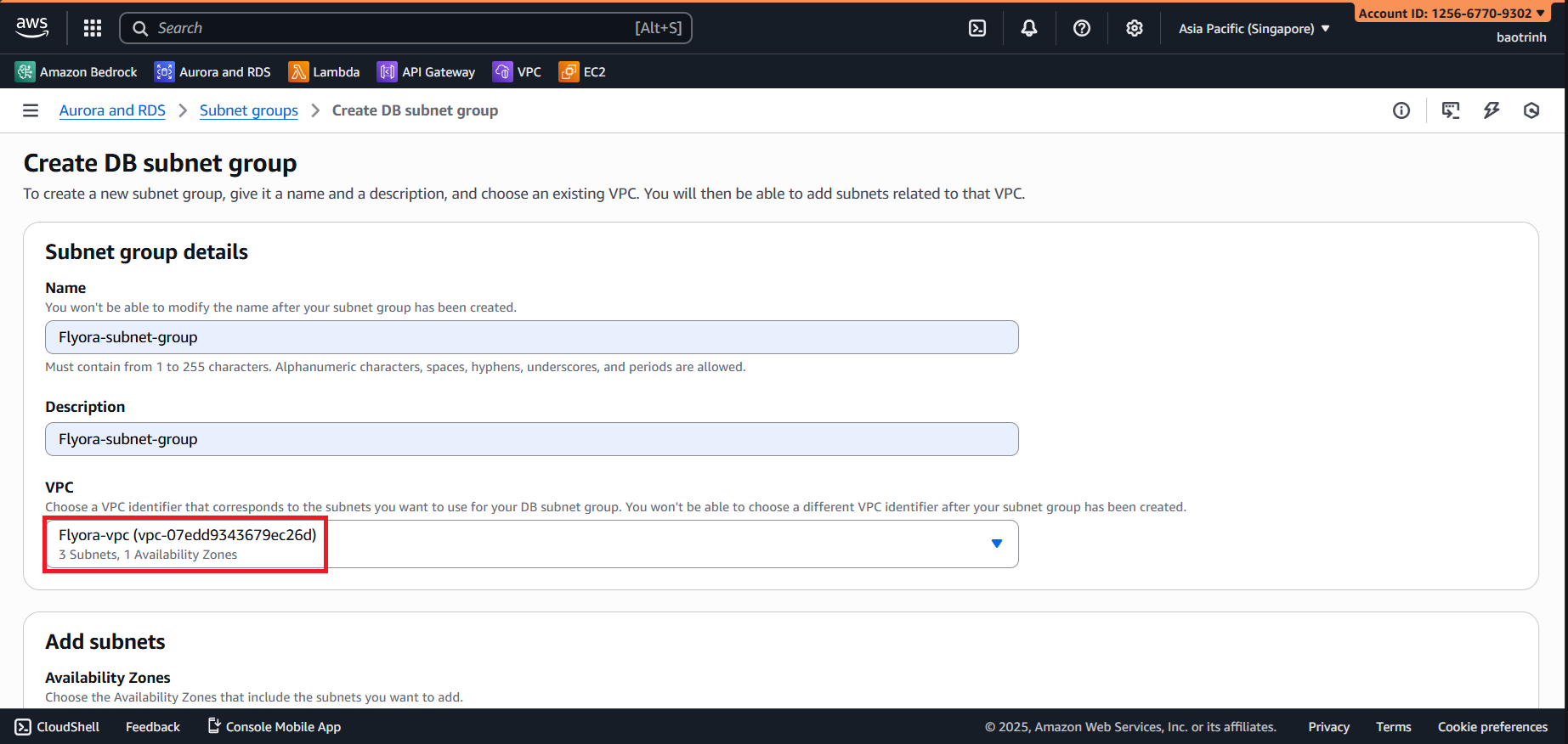
- For AZ select
ap-southeast-1aandap-southeast-1b. For Subnets, select the 2 private subnets, then click Create.
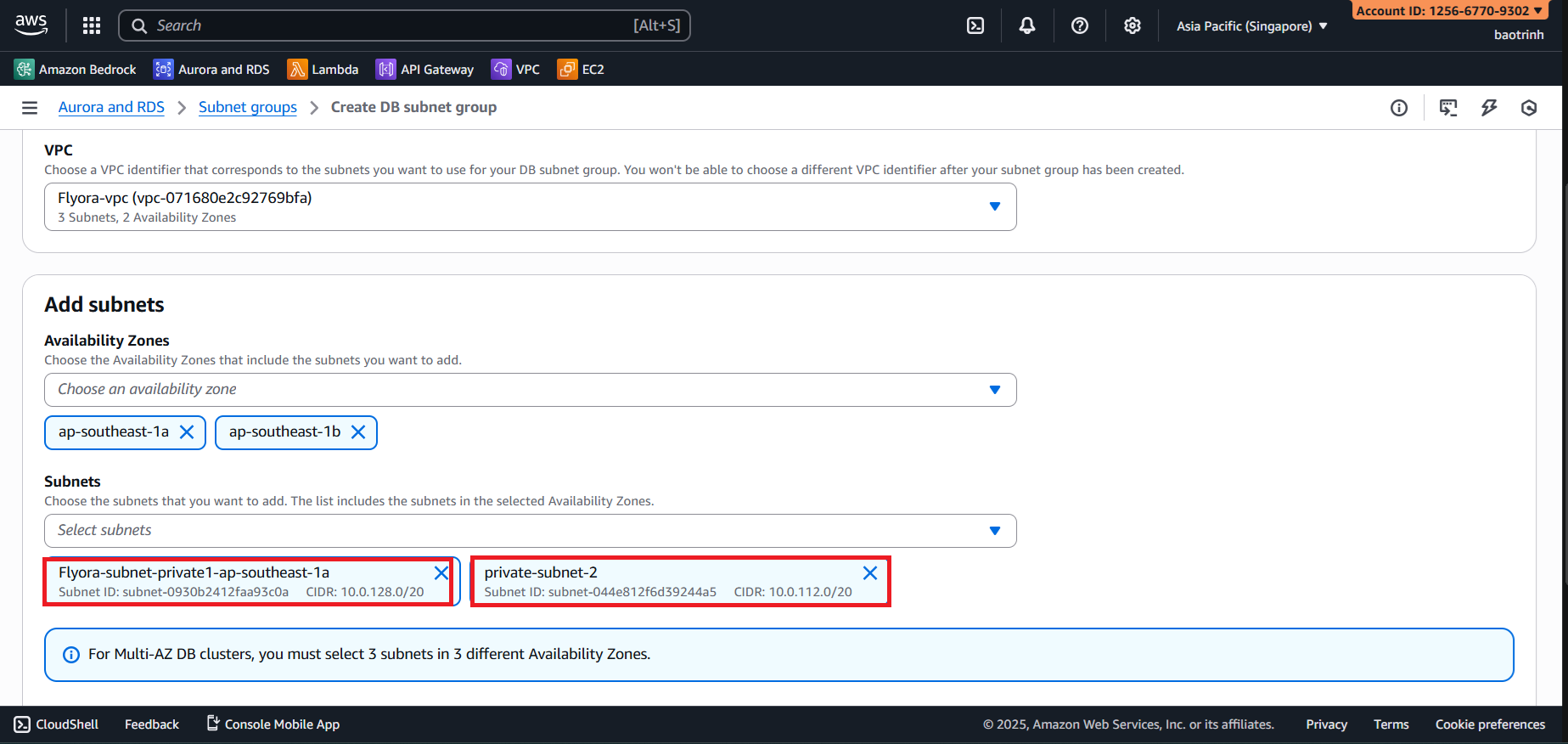
2. Create RDS
- Go to databases → Create database.
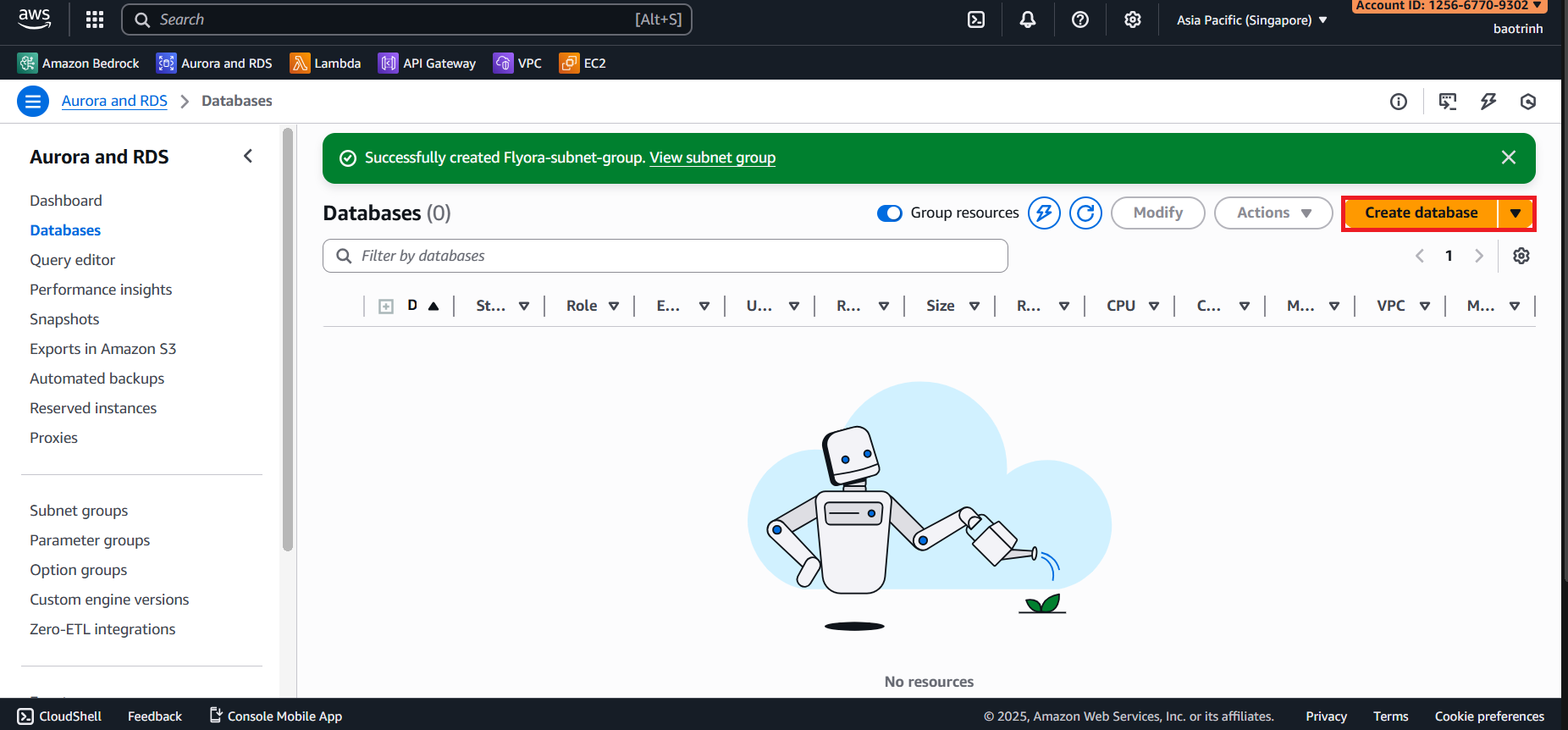
- In the database configuration section, select Full configuration, select PostgreSQL. In Templates select Sandbox. In Settings, name the DB and set a password.
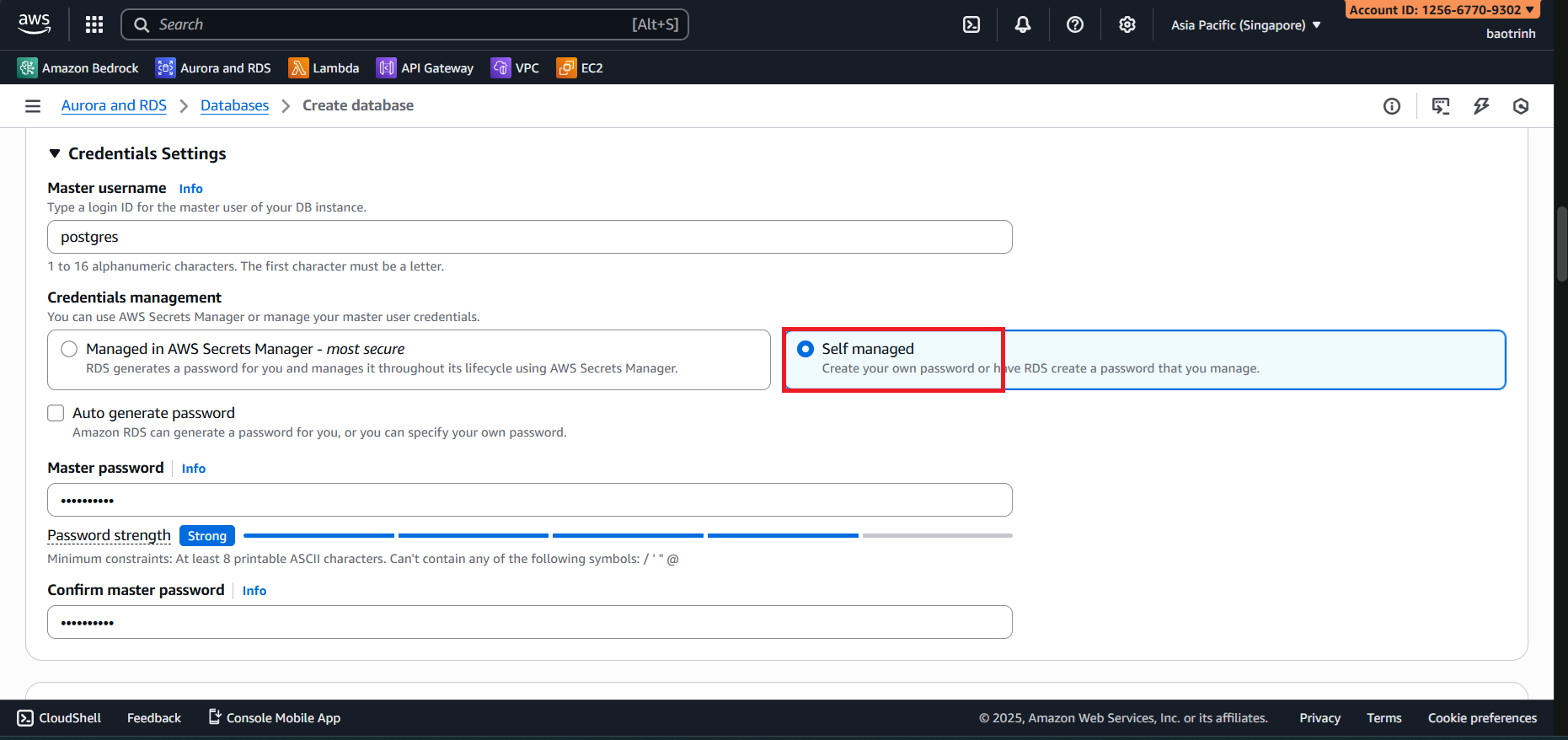
- Configure the remaining parts as follows:
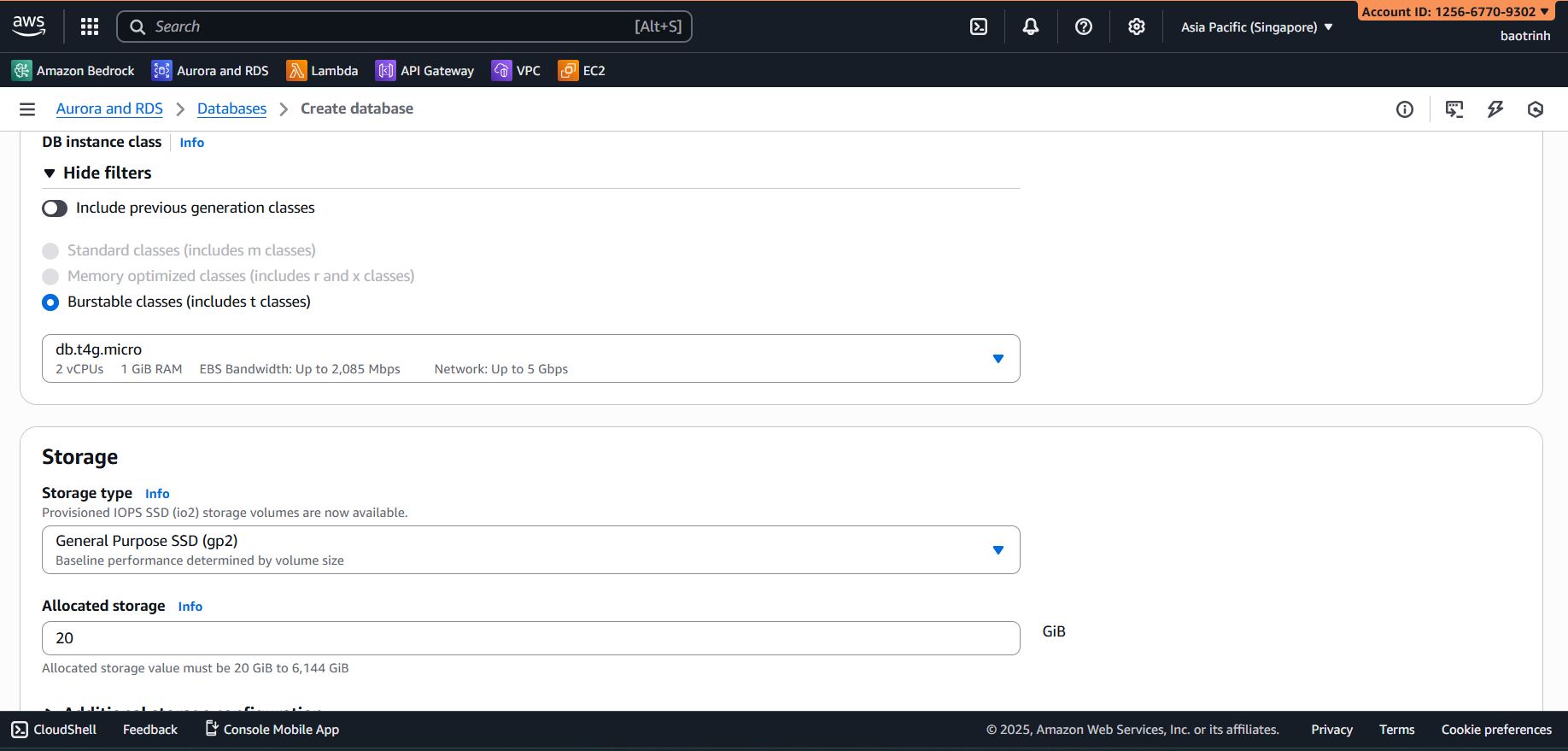
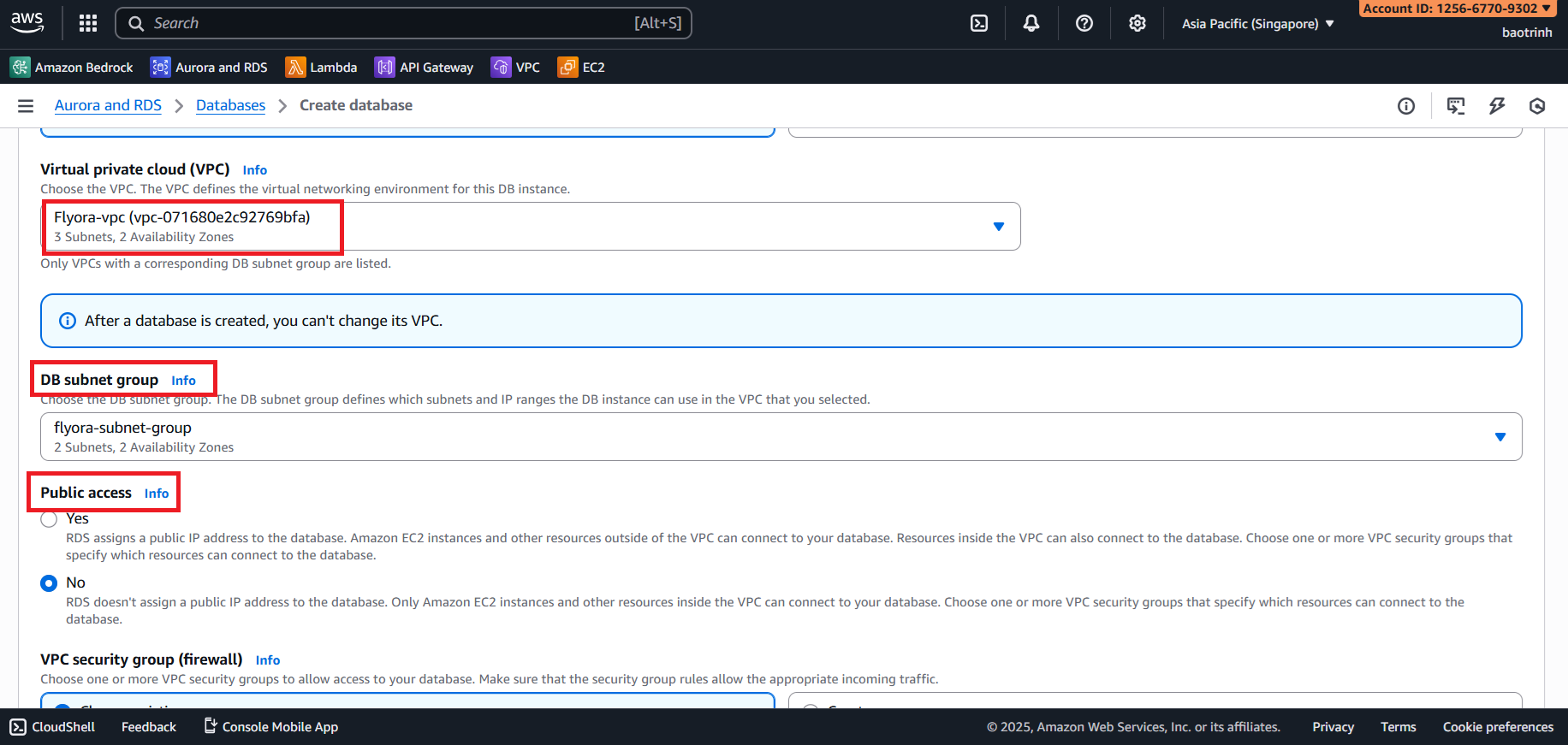
- In the Connectivity section, select the VPC created and the DB subnet group. Set Public access to No. In the VPC security group section, select the Security group created for RDS. Keep the rest as default and click Create.
1. Store Data and Connect to PostgreSQL using DBeaver
- You can download DBeaver here: https://dbeaver.io/
Download the knowledge_base file from here.
To connect from the local machine to DBeaver, we need to create an EC2 instance to act as a bridge.
Access EC2 → Launch instance.
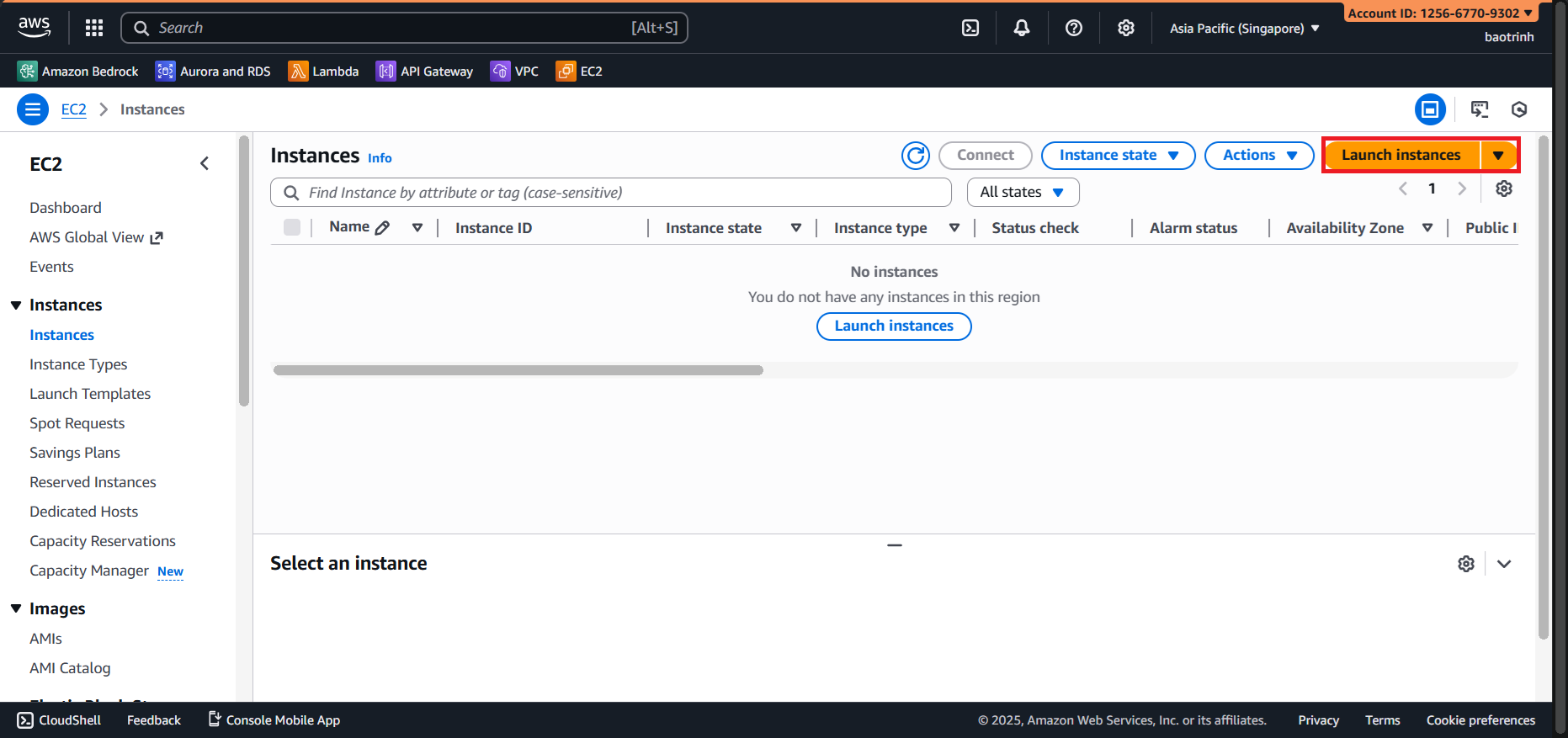
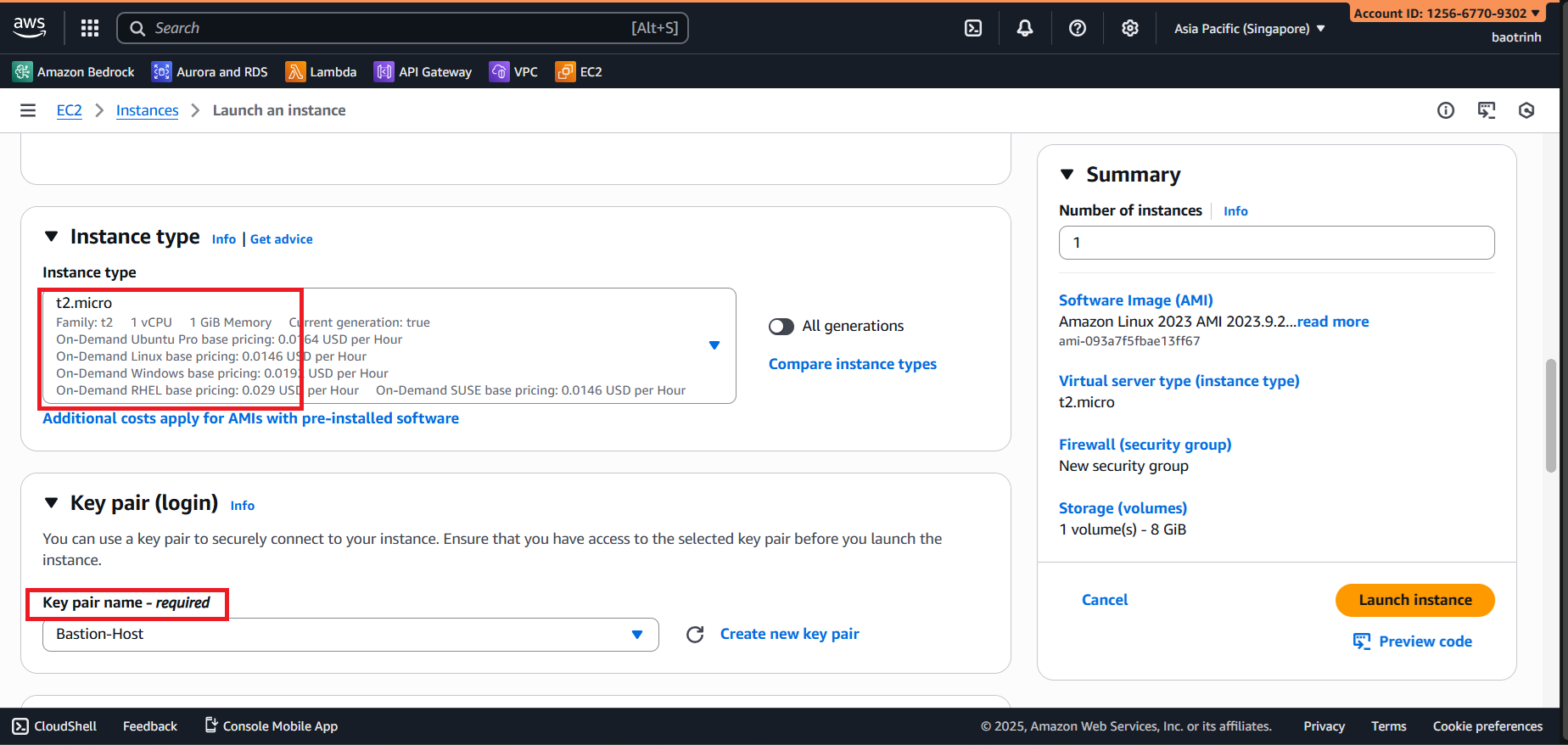
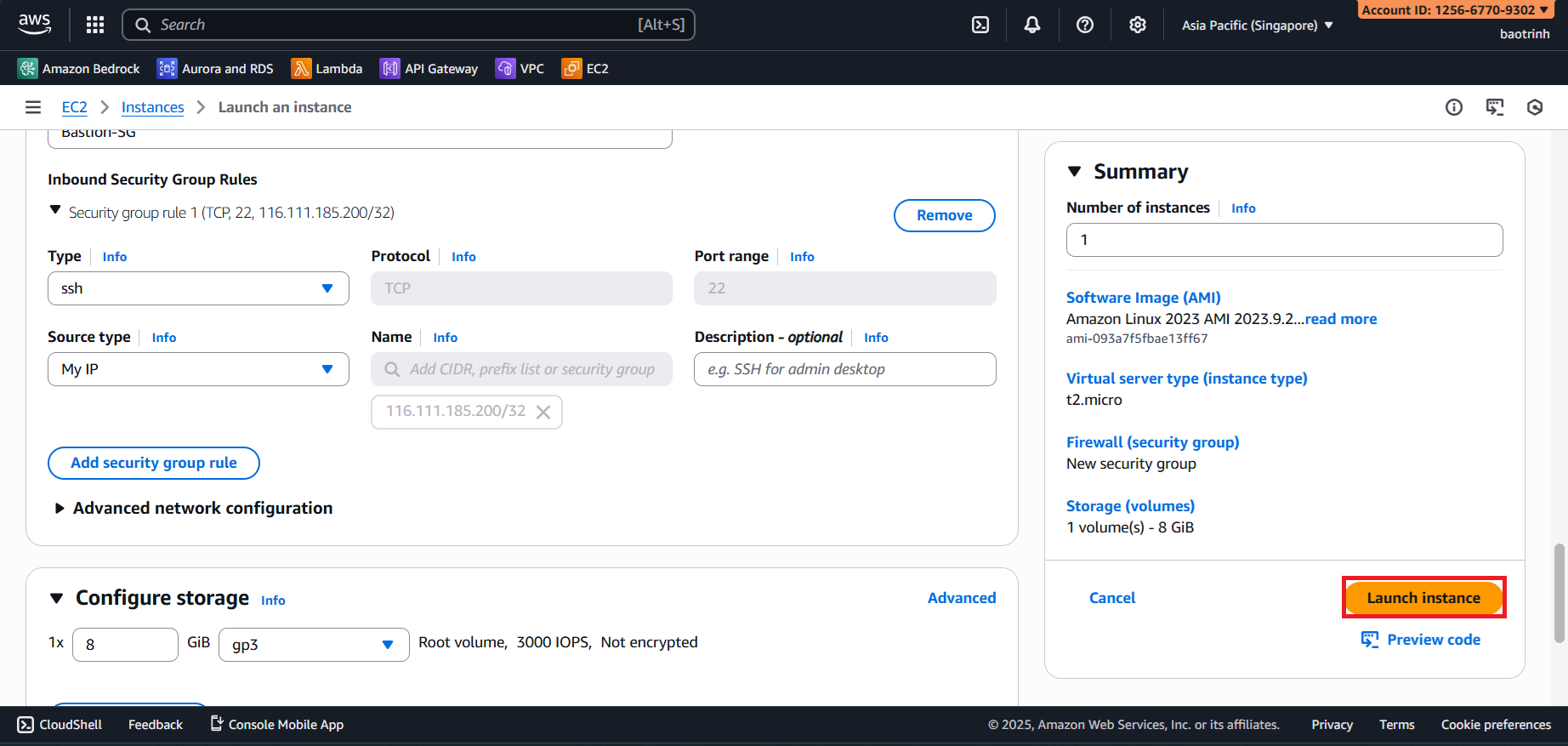
- Name the EC2, select Instance type
t2.micro, create a key pair, and save it to your machine.
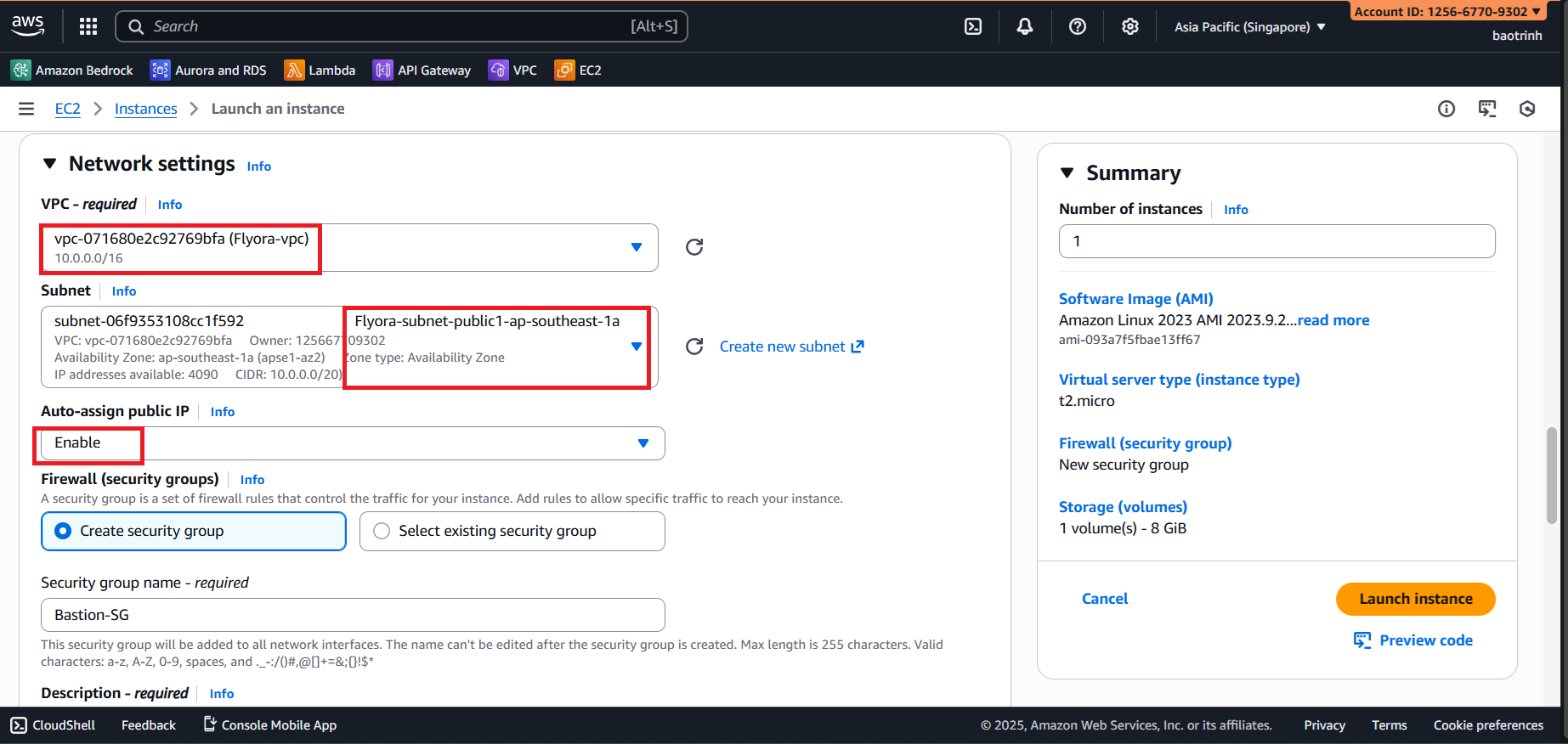
- In Network settings, select the VPC created, select a public subnet, and create a Security group.
- In Inbound Security Group Rules, select ‘My IP’, then Launch instance.
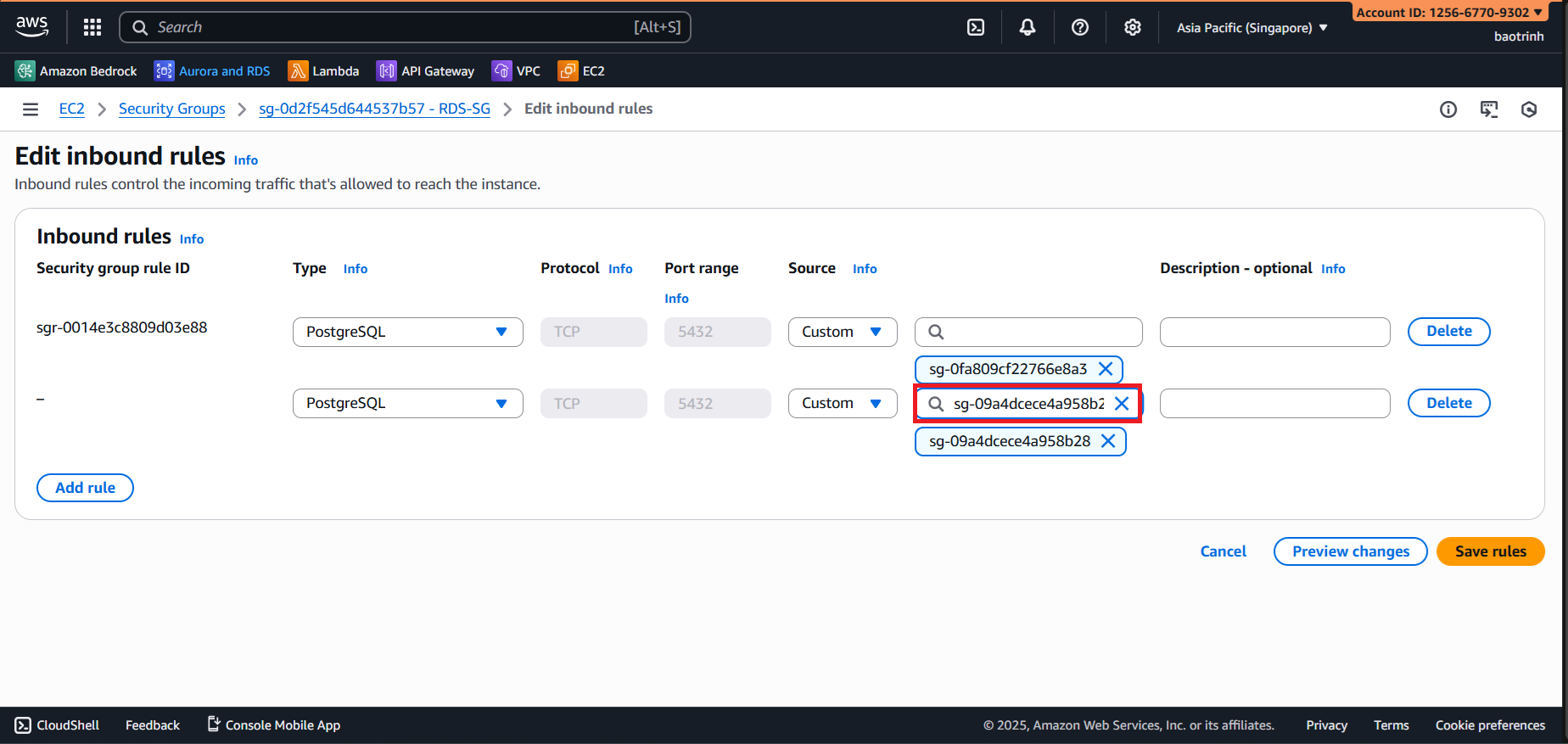
- Next, go to the RDS Security group section, edit the inbound rules, and add a new rule. Type: PostgreSQL and Source: the newly created EC2.
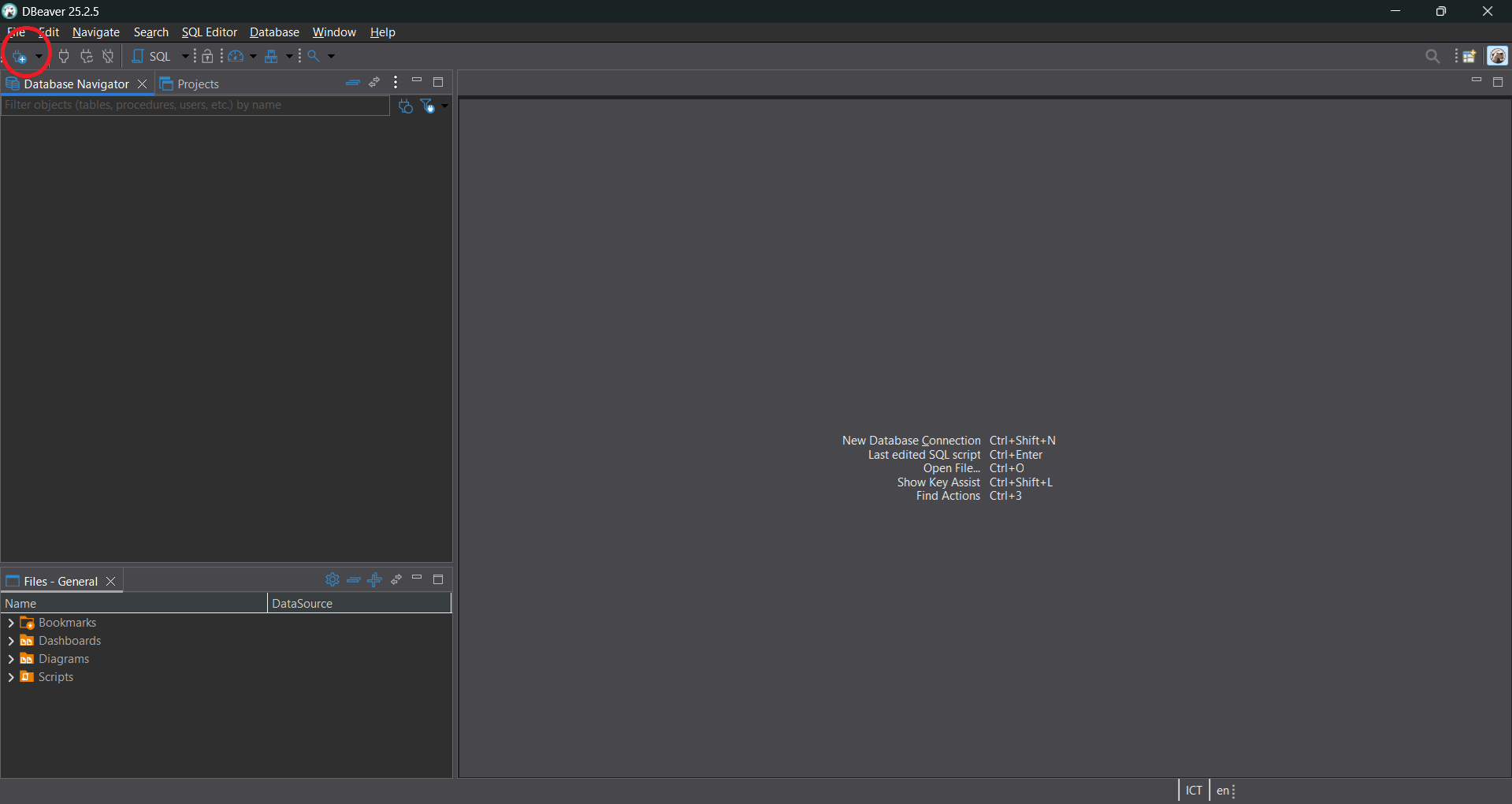
- Open DBeaver and click on the connection section.
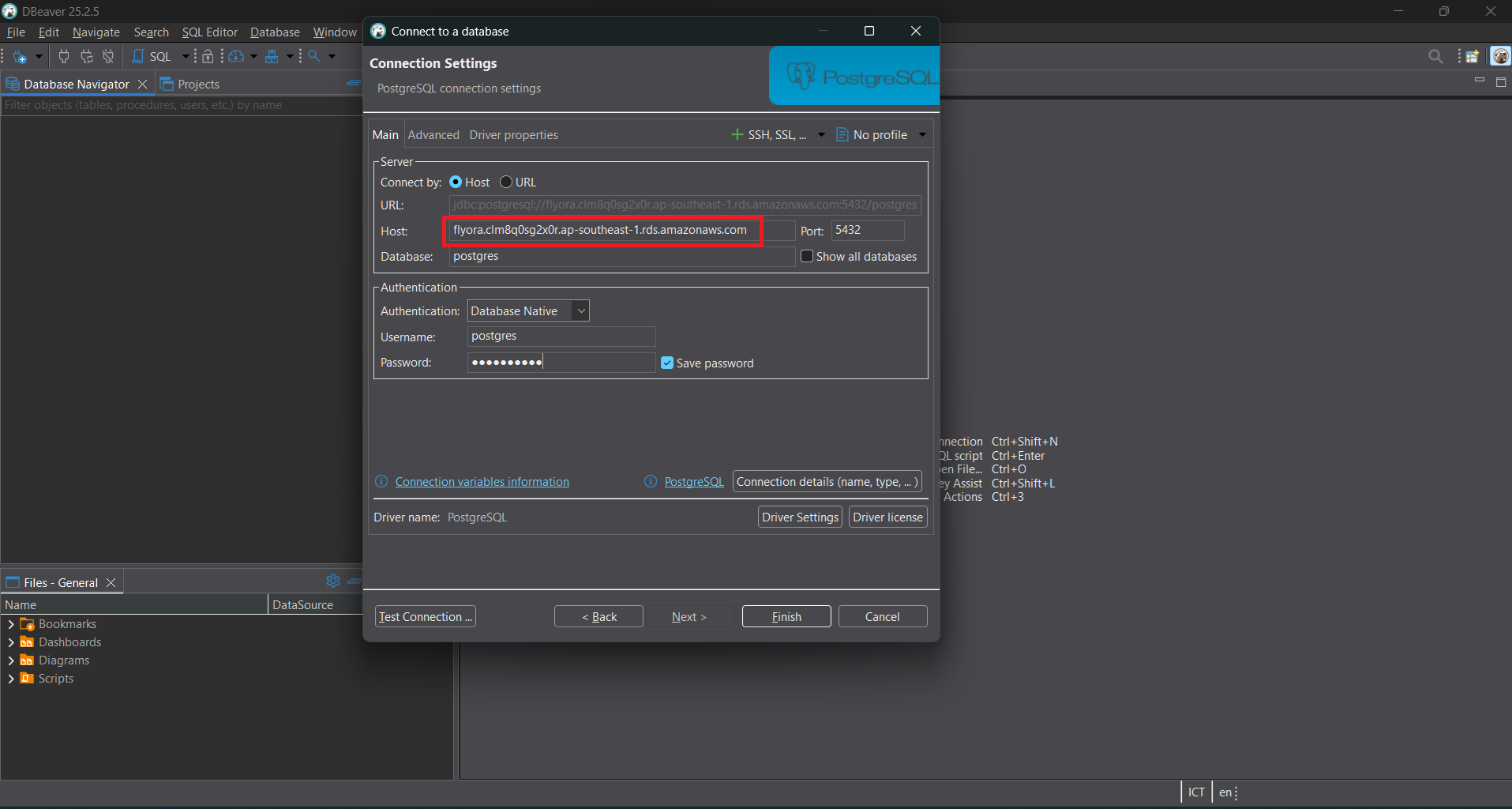
- Select PostgreSQL. In the Host section, copy the RDS Endpoint. Fill in the information you used when creating the RDS.
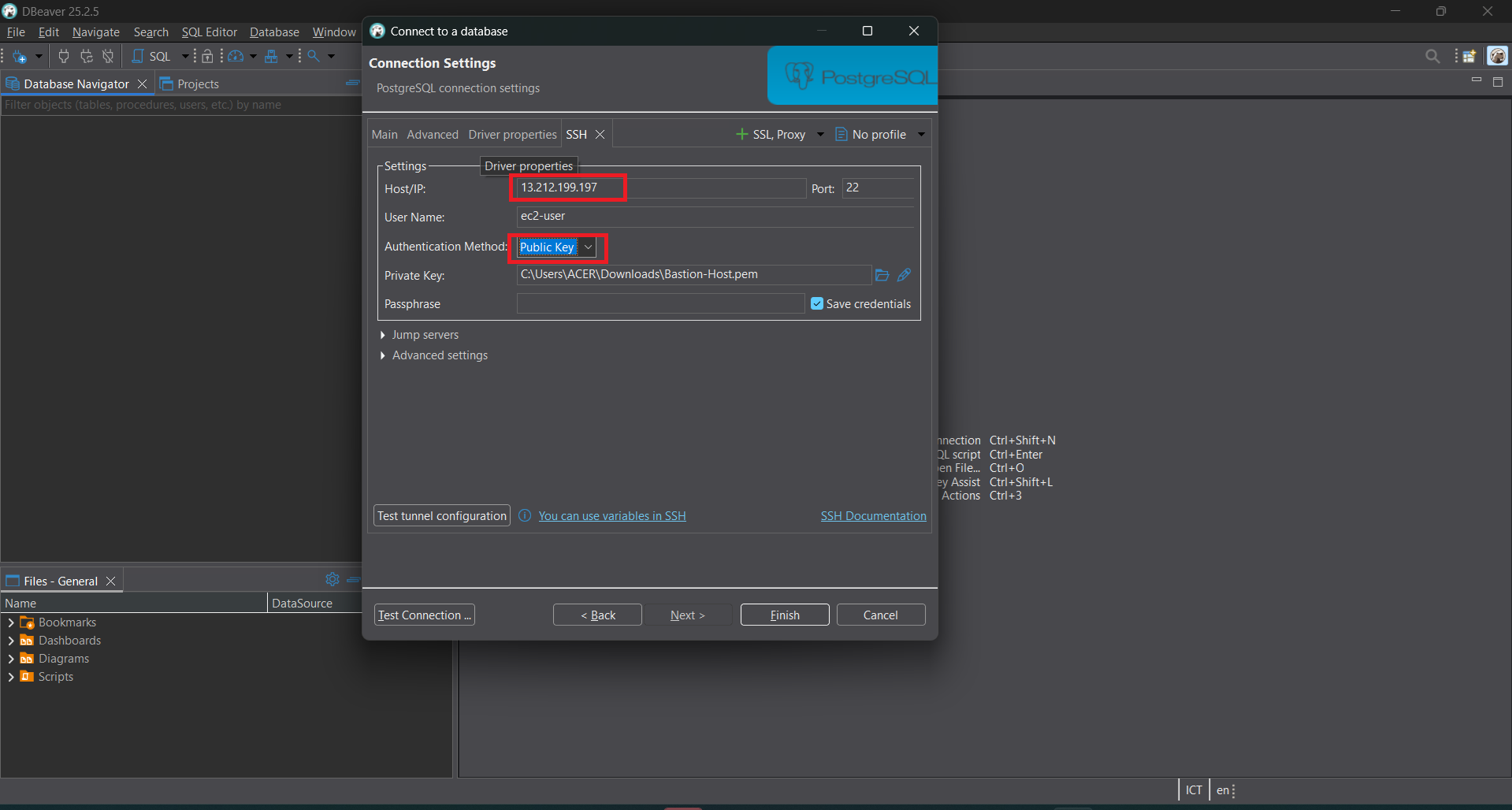
- Click on the SSH tab. In Host/IP, copy the Public IP of the EC2. For User Name, enter
ec2-user. In Authentication Method, select Public Key and choose the key pair created with the EC2. Then click Test connection and Finish.
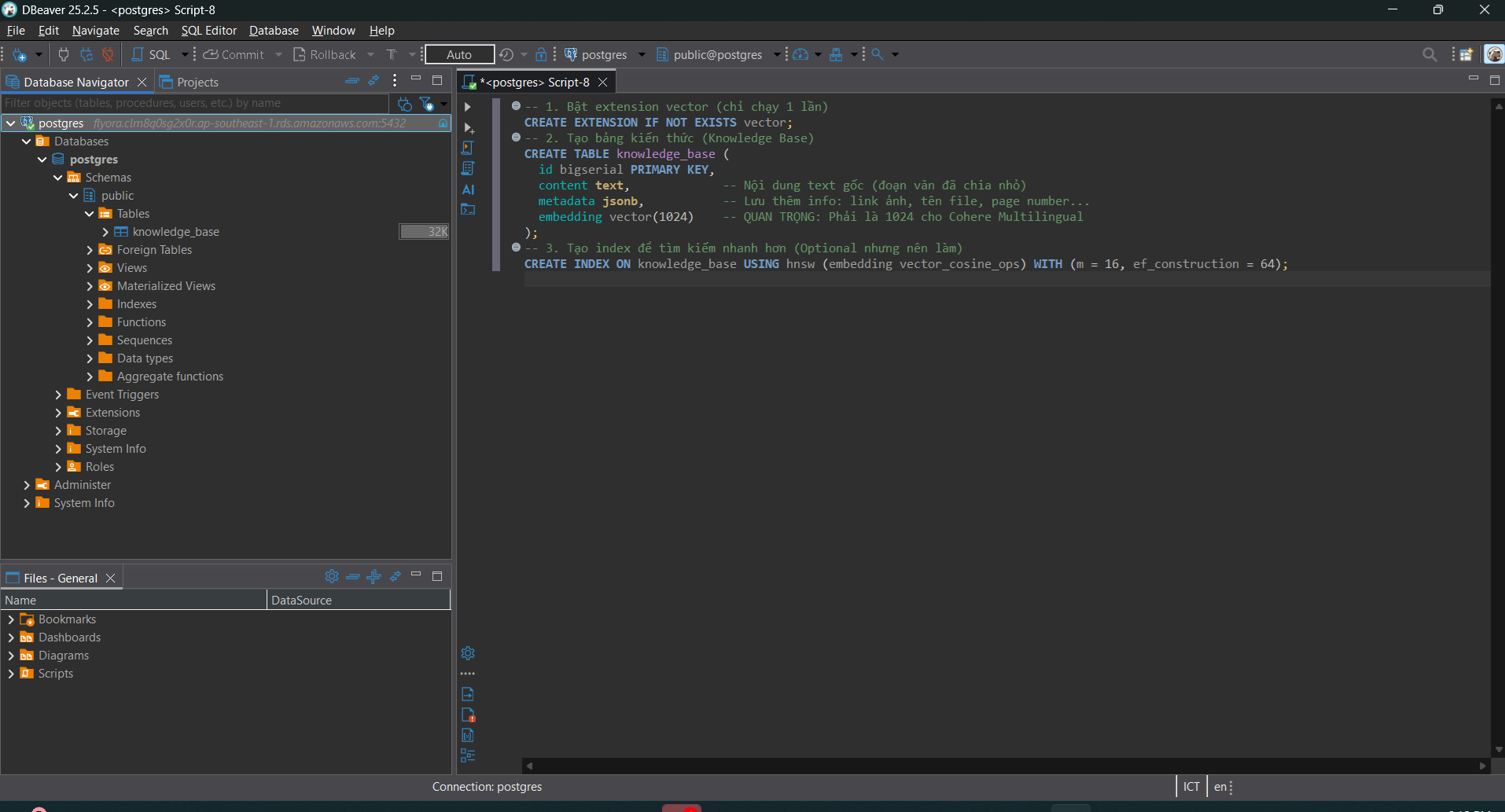
After successfully connecting, open an SQL script and paste this code to create the
knowledge_basetable. After creating the table, refresh the database to show theknowledge_basetable.-- 1. Enable vector extension (run only once) CREATE EXTENSION IF NOT EXISTS vector; -- 2. Create knowledge base table (Knowledge Base) CREATE TABLE knowledge_base ( id bigserial PRIMARY KEY, content text, -- Original text content (chunked text) metadata jsonb, -- Store extra info: image link, filename, page number... embedding vector(1024) -- IMPORTANT: Must be 1024 for Cohere Multilingual ); -- 3. Create index for faster search CREATE INDEX ON knowledge_base USING hnsw (embedding vector_cosine_ops) WITH (m = 16, ef_construction = 64);
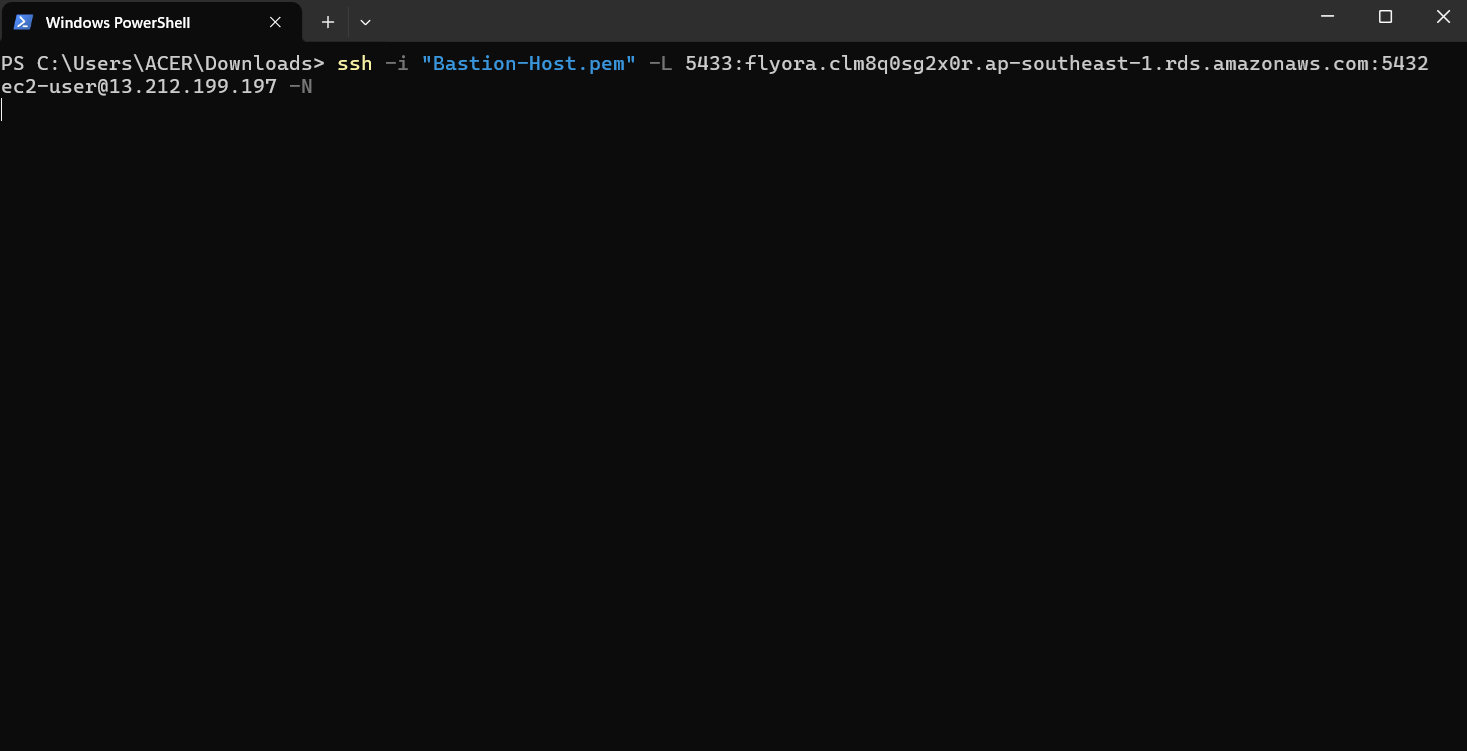
To import data into DBeaver using Python, we need to SSH via CMD. Open CMD in the folder containing the keypair and copy this command:
ssh -i "my-key.pem" -L 5433:RDS endpoint port:5432 ec2-user@public IP EC2 -N
Then, run this Python script to import data into DBeaver.
import pandas as pd
import json
import boto3
import psycopg2
import time
import glob
import os
import numpy as np
from dotenv import load_dotenv

# ==========================================
# 1. CONFIGURATION & SECURITY
# ==========================================
current_dir = os.path.dirname(os.path.abspath(__file__))
env_path = os.path.join(current_dir, 'pass.env')
load_dotenv(env_path)

CSV_FOLDER = './database'
DB_HOST = os.getenv("DB_HOST")
DB_NAME = os.getenv("DB_NAME")
DB_USER = os.getenv("DB_USER")
DB_PASS = os.getenv("DB_PASS")

# AWS Connection
bedrock = boto3.client(
    service_name='bedrock-runtime',
    region_name='ap-southeast-1',
    aws_access_key_id=os.getenv("aws_access_key_id"),
    aws_secret_access_key=os.getenv("aws_secret_access_key")
)

# ==========================================
# 2. TRANSLATION DICTIONARY (MOST IMPORTANT)
# ==========================================

# A. Translate Column Names (For AI context)
COLUMN_MAP = {
    "price": "Price", "gia": "Price", "cost": "Cost", "fee": "Fee",
    "stock": "Stock", "so_luong": "Stock",
    "description": "Description", "mo_ta": "Description", "chi_tiet": "Details",
    "origin": "Origin", "xuat_xu": "Origin",
    "material": "Material", "chat_lieu": "Material",
    "color": "Color", "mau_sac": "Color",
    "weight": "Weight", "trong_luong": "Weight",
    "food_type": "Food Type",
    "usage_target": "Suitable for bird species",
    "furniture_type": "Furniture Type",
    "time": "Processing Time", "thoi_gian": "Processing Time",
    "method_name": "Method Name"
}

# B. Translate Values (For Website display) <--- PART YOU NEED
VALUE_TRANSLATIONS = {
    "FOODS": "Food",
    "Foods": "Food",
    "foods": "Food",

    "TOYS": "Toys",
    "Toys": "Toys",
    "toys": "Toys",

    "FURNITURE": "Furniture",
    "Furniture": "Furniture",
    "furniture": "Furniture",

    "Bird": "Pet Bird",
    "bird": "Pet Bird"
}

# --- AUXILIARY FUNCTIONS ---
def get_embedding(text):
    try:
        if not text or len(str(text)) < 5: return None
        body = json.dumps({"texts": [str(text)], "input_type": "search_document", "truncate": "END"})
        response = bedrock.invoke_model(body=body, modelId="cohere.embed-multilingual-v3", accept="application/json", contentType="application/json")
        return json.loads(response['body'].read())['embeddings'][0]
    except: return None

def clean(val):
    if pd.isna(val) or str(val).lower() in ['nan', 'none', '', 'null']: return ""
    val_str = str(val).strip()

    # --- AUTO TRANSLATE HERE ---
    # If the value exists in the translation dictionary, replace it immediately
    if val_str in VALUE_TRANSLATIONS:
        return VALUE_TRANSLATIONS[val_str]

    return val_str

def main():
    try:
        conn = psycopg2.connect(host=DB_HOST, database=DB_NAME, user=DB_USER, password=DB_PASS, port=5433) # Note the SSH port 5433
        cur = conn.cursor()
        print("✅ Database connection successful!")
    except Exception as e:
        print(f"❌ DB Connection Error: {e}"); return

    csv_files = glob.glob(os.path.join(CSV_FOLDER, "*.csv"))
    print(f"📂 Found {len(csv_files)} CSV files.")

    # Statistics variables
    stats = {"bird": 0, "food": 0, "toy": 0, "furniture": 0, "best_sellers": []}
    total_success = 0

    for file_path in csv_files:
        filename = os.path.basename(file_path).lower()
        print(f"\n--- Processing file: {filename} ---")

        try:
            df = pd.read_csv(file_path)
            df = df.replace({np.nan: None})

            # Auto-detect category (Prefix)
            category_prefix = "Product"
            if "bird" in filename: category_prefix = "Bird Species"
            elif "food" in filename: category_prefix = "Bird Food"
            elif "toy" in filename or "do_choi" in filename: category_prefix = "Bird Toy"
            elif "furniture" in filename: category_prefix = "Cage Furniture"
            elif "ship" in filename or "delivery" in filename: category_prefix = "Shipping Method"
            elif "payment" in filename: category_prefix = "Payment Method"

            for index, row in df.iterrows():
                # Statistics
                if "bird" in filename: stats["bird"] += 1
                elif "food" in filename: stats["food"] += 1
                elif "toy" in filename: stats["toy"] += 1
                elif "furniture" in filename: stats["furniture"] += 1

                # A. IDENTITY
                p_id = clean(row.get('id') or row.get('product_id') or row.get('payment_id'))
                name = clean(row.get('name') or row.get('product_name') or row.get('title') or row.get('method_name'))
                if not name:
                    if p_id: name = f"Code {p_id}"
                    else: continue

                # B. AUTO SCAN COLUMNS AND TRANSLATE
                content_parts = [f"{category_prefix}: {name}"]

                # Scan all columns, if exists in COLUMN_MAP then add
                for col_key, col_val in row.items():
                    val_clean = clean(col_val) # clean function will auto translate FOODS -> Food
                    if val_clean and col_key in COLUMN_MAP:
                        content_parts.append(f"{COLUMN_MAP[col_key]}: {val_clean}")

                # C. HANDLE PRICE & STOCK & BEST SELLERS SEPARATELY
                price = clean(row.get('price') or row.get('gia') or row.get('fee'))
                if price: content_parts.append(f"Price: {price}")

                stock = clean(row.get('stock') or row.get('so_luong'))
                if stock: content_parts.append(f"Stock: {stock}")

                sold = clean(row.get('sold') or row.get('da_ban'))
                if sold:
                    content_parts.append(f"Sold: {sold}")
                    try:
                        if float(sold) > 0: stats["best_sellers"].append((float(sold), name, category_prefix))
                    except: pass

                content_to_embed = ". ".join(content_parts) + "."

                # D. CREATE METADATA (Also use translated values)
                # Note: The clean() function above already translated, so we call clean() again for each field
                metadata = {}
                for k, v in row.items():
                    metadata[k] = clean(v) # Save to metadata in English

                # Overwrite standard fields
                metadata['id'] = p_id
                metadata['name'] = name
                metadata['price'] = price if price else "Contact"
                metadata['type'] = category_prefix
                metadata['image'] = clean(row.get('image_url') or row.get('link_anh'))
                metadata['sold'] = sold

                # E. INSERT
                vector = get_embedding(content_to_embed)
                if vector:
                    cur.execute(
                        "INSERT INTO knowledge_base (content, embedding, metadata) VALUES (%s, %s, %s)",
                        (content_to_embed, json.dumps(vector), json.dumps(metadata, default=str))
                    )
                    total_success += 1
                    if total_success % 10 == 0:
                        print(f"   -> Loaded {total_success} rows...")
                        conn.commit()
                        time.sleep(0.1)

        except Exception as e:
            print(f"⚠️ Error processing file {filename}: {e}"); continue

    # --- CREATE STATISTICS REPORT ---
    print("\n--- Creating statistics report... ---")
    top_products = sorted(stats["best_sellers"], key=lambda x: x[0], reverse=True)[:5]
    top_names = ", ".join([f"{p[1]} ({int(p[0])} purchases)" for p in top_products])

    summary_content = (
        f"BIRD SHOP STATISTICS REPORT: "
        f"Total birds: {stats['bird']}. Food: {stats['food']}. "
        f"Toys: {stats['toy']}. Furniture: {stats['furniture']}. "
        f"TOP 5 BEST SELLING PRODUCTS: {top_names}."
    )

    summary_vector = get_embedding(summary_content)
    if summary_vector:
        cur.execute("INSERT INTO knowledge_base (content, embedding, metadata) VALUES (%s, %s, %s)",
                    (summary_content, json.dumps(summary_vector), json.dumps({"id":"STATS","name":"Statistics"}, default=str)))
        conn.commit()

    cur.close(); conn.close()
    print(f"\n🎉 COMPLETED! Total imported: {total_success + 1} rows.")

if __name__ == "__main__":
    main()
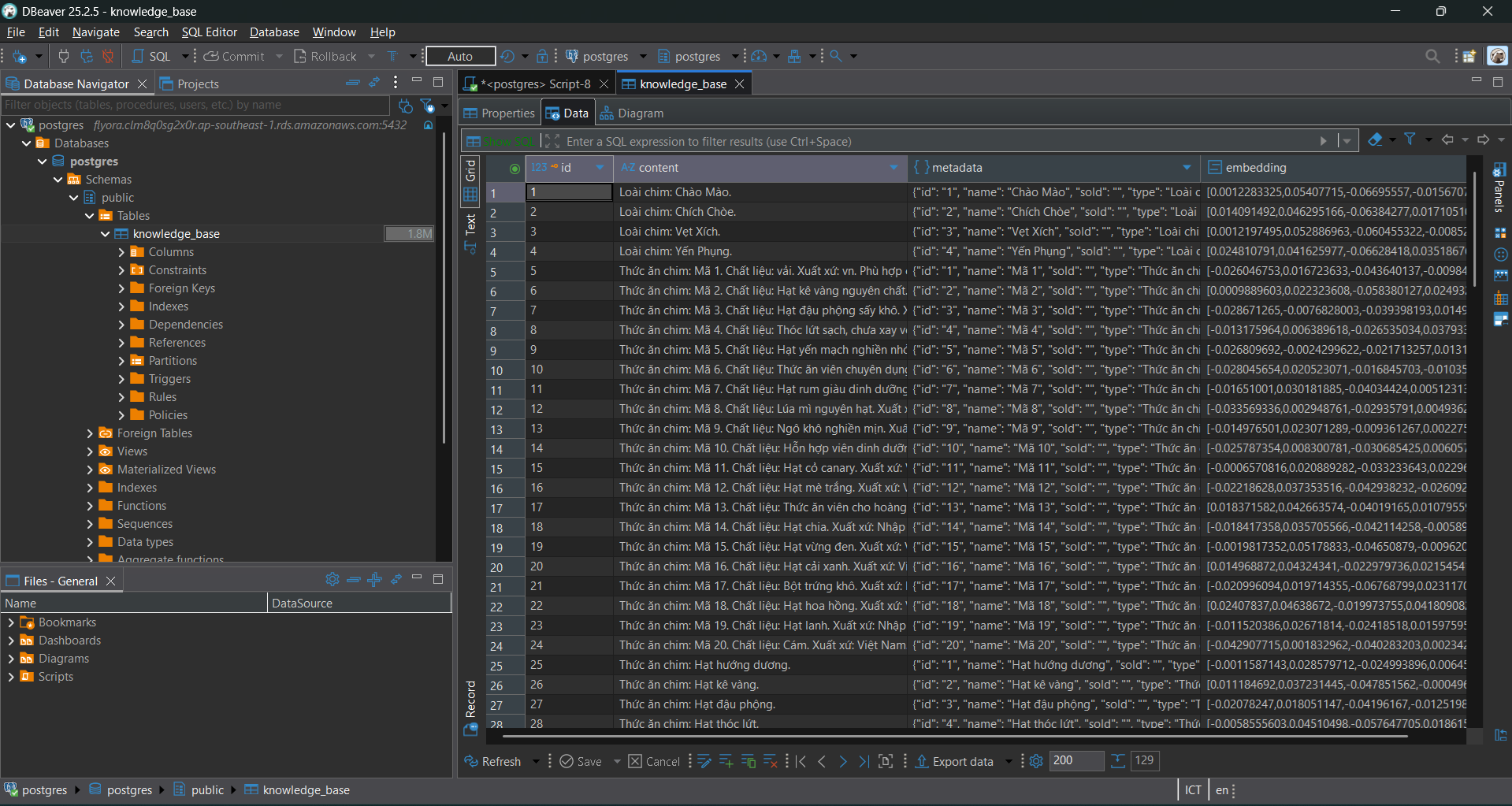
After importing, refresh the
knowledge_basetable to see the results.